Language: EN
Start free

Off the hanger, onto a model, for Avocadostore.

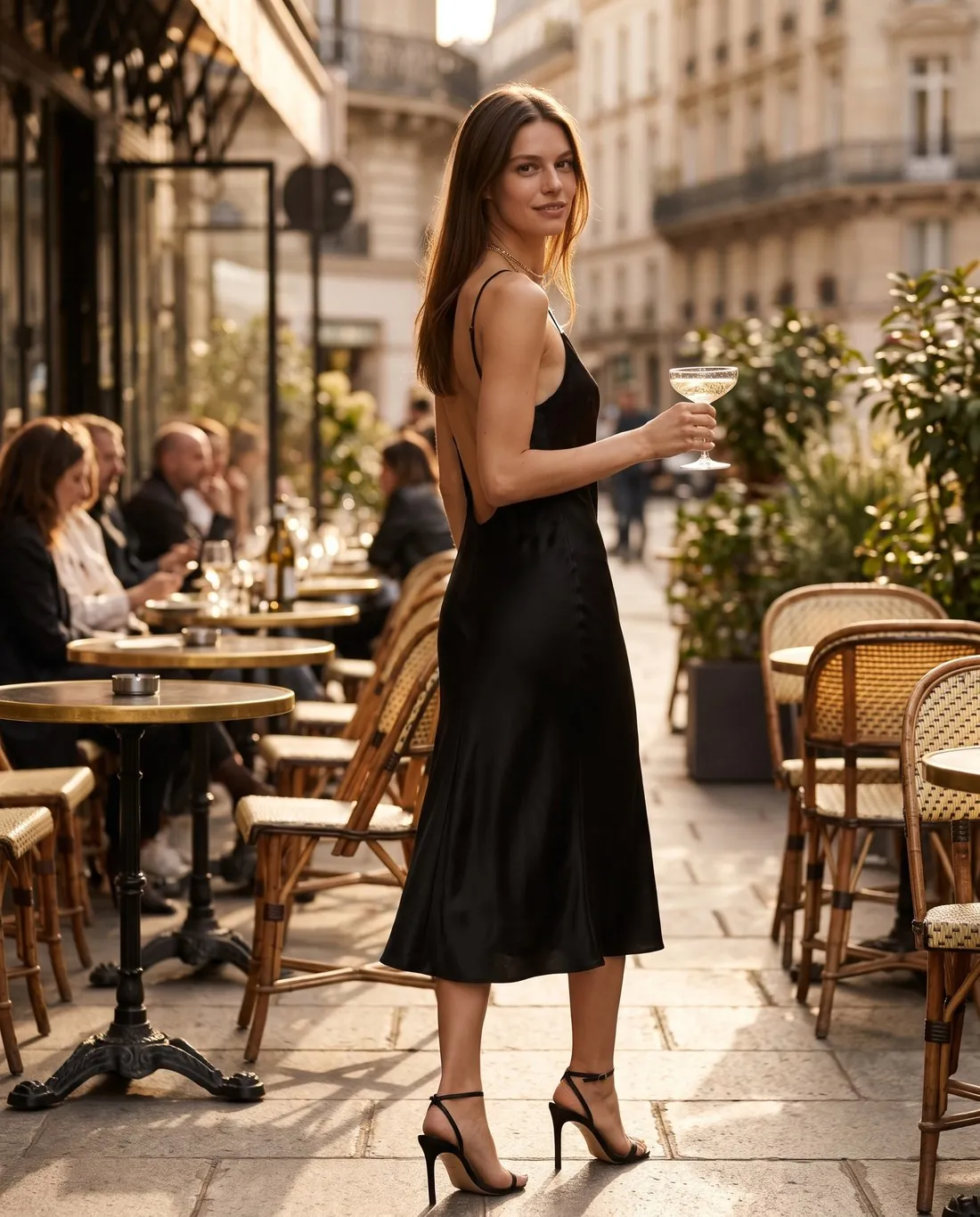
Avocadostore does not accept clothing on hangers, on mannequins or lying flat, and its ideal main image is a mood image. Virtual try-on delivers model images, a type Avocadostore shows as good main images. Herofab has no ratio matching Avocadostore's portrait format; the closest one is trimmed slightly in height before upload.

Model in a black satin slip midi dress with an open back, holding a champagne coupe on a café terrace · Virtual try-on
Herofab campaign image · AI-generated
Worth knowing

Where Avocadostore's styleguide meets an AI model image.

  1. 1

    No hangers, mannequins or flat lays

    Clothing on a hanger, on a mannequin or lying flat is not allowed; flat lays are permitted for children's fashion only. Such a photo can still be the source: Virtual try-on dresses a model in the garment, and the source stays out of the listing. Watermarks added to a photo are not allowed either, and images made on free credits carry one.

  2. 2

    The closest ratio, trimmed in height

    Avocadostore asks for one portrait format and does not accept landscape images. Herofab has no matching ratio. The closest, the four-by-five portrait, is a little taller, so it is trimmed slightly in height before upload; at 4K it stays above the size Avocadostore calls optimal. Check that the trim falls on background, not on the garment.

  3. 3

    Avocadostore's guidance on AI images

    Avocadostore asks sellers to ensure the AI platform permits commercial use and to consider the rights of models, to depict products realistically and make AI-generated model images look realistic, and, for greater transparency, to add a note to the product description stating that the image is AI-generated.

In marketplace rules

What Avocadostore asks for.

Source: Avocadostore — Styleguide 2026. Checked 27 September 2026.

Format
Portrait, aspect ratio 1:1.2; landscape images are not accepted
Size
At least 1,000 × 1,200 pixels and 72 dpi; optimal from 2,560 × 3,072 pixels — only images of this size or larger are suitable for marketing by Avocadostore's team
File
JPG, PNG, TIFF or WEBP, up to 50 MB
Framing
The product occupies at least 80% of the available image area; black-and-white photographs are not accepted
Main image
Ideally a mood image; alternatively Avocadostore recommends a subtle, single-colour background in cream, beige, light grey or white; no graphics on the main image
Not allowed
Clothing on hangers or mannequins, or lying flat (flat lays are permitted for children's fashion); collages and several colour variants in one image; logos, watermarks, brand names, text or advertising messages added to the photo — size charts, infographics and certain seals only as the last image
AI images
Ensure the AI platform permits commercial use and consider the rights of models; depict products realistically and make AI-generated model images look realistic; for greater transparency, add a note to the product description stating that the image is AI-generated
Number
Up to 12 views can be uploaded
Group photos
Generally not permitted, as all products must be visible individually; exceptions: the product is unisex, the products shown are sold as a set, or the group photo is placed as the last image
Colour variants
Each colour variant must be shown as a separate image, and only variants on offer may be displayed; the colour variations may be shown together in the last picture
Children's fashion
Flat lay images are permitted; children's clothing is not shown on mannequins, on hangers or on hangers that have been retouched afterwards
Source photo

The source photo that never reaches the listing.

  • A hanger or a flat surface is fine for the source photo, since only the model image goes to Avocadostore; show the garment complete, from collar to hem and from cuff to cuff.
  • Photograph in colour and in daylight, flash off: Avocadostore does not accept black-and-white photographs, and the shade the camera records is the shade the model image is briefed to keep.
  • Shoot each colour of a garment on its own. Several colour variants in one image are not allowed on Avocadostore, and a single item per photo is also what try-on works from.

What the styleguide turns away, image by image

Several rejections concern the frame. Landscape images are not accepted, nor are black-and-white photographs, and the product has to occupy at least four fifths of the image area. Collages and several colour variants in one image are excluded, and only variants actually on offer may be shown at all.

Others concern what accompanies the product. Group photos are generally not permitted, since each product must be visible on its own, apart from unisex items, sets and a group photo placed last. Children's clothing may not appear on mannequins or on hangers, not even hangers retouched away afterwards.

Model, hollow shape or flat lay, by product

For adult clothing, Virtual try-on gives the model image: at one of its locations where a mood image is wanted, or on studio white or grey for the plainer alternative. Ghost mannequin's 3D style produces the hollow-body shot the styleguide shows among good main images, and Product studio places shoes or bags on white or beige.

Children's fashion is the case where flat lays are permitted while mannequins and hangers are not, so Ghost mannequin's flat-lay style matches that wording more directly than the hollow-body style. Colour variants can turn one shot into a series, but each variant shown has to be on offer and is compared with the real colour.

Twelve views, with the last one reserved

Up to twelve views can be uploaded, and the last position has a role of its own: size charts, infographics, certain seals, a permitted group photo and colour variations shown together go there. The views before it show one product in one colour each, starting with the main image.

No download size is set for this marketplace, but a free resizer preset targets the size called optimal. It pads rather than trims, so a four-by-five image gains narrow bands at the sides: unseen on studio white, visible beside a location scene, where trimming the height suits better. The resized file also loses the embedded AI marker.

Questions

Product photos for Avocadostore, answered.

What should the main image on Avocadostore be?

Ideally a mood image; as the alternative Avocadostore recommends a subtle, single-colour background in cream, beige, light grey or white, and it allows no graphics on the main image. Virtual try-on offers locations such as a garden, a city street or a café terrace, and studio white or grey. Which of these reads as a mood image is for the seller to judge against the styleguide.

Is there an Avocadostore format in Herofab?

No ratio in Herofab matches Avocadostore's portrait format. The four-by-five portrait comes closest and is trimmed slightly in height before upload; that trim is a step the seller carries out. Ordered in 4K, the image stays above the size Avocadostore calls optimal, the size from which its team regards images as suitable for marketing.

Is the AI marker in the file enough for Avocadostore?

Not by itself. Every Herofab image carries a machine-readable AI marker in the file, and Avocadostore also asks for a note in the product description saying the image is AI-generated. Herofab's models are synthetic, not photographed people; a model photo the seller uploads needs that person's permission. Whether a platform permits commercial use is for the seller to confirm in its terms.

Which images may appear only in the last position?

Size charts, infographics and certain seals, a group photo where that exception is used, and colour variations shown together. Every view before it shows a single product without added graphics, one colour per image, so these items are planned for the end of the set.

Does a full-length model image meet the framing share for the product?

The styleguide wants the product to occupy at least four fifths of the image area, and on a full-length try-on a top covers less of the frame than the model does. Waist-up and close-up framings bring the garment closer; how the share applies to model images is read in the styleguide's own examples.

How much does it cost?

5 credits per image, plus one credit for 4K. In US dollars that is $0.20 to $0.60 per image before tax, from the largest plan to the smallest credit pack. The cost is shown before you generate, and if a job fails the credits are returned. The 20 free credits at sign-up cover 4 images with this tool.

Examples by product
Get started

Your next collection, shot this week.

20 credits at sign-up, no card required. Images made with free credits carry a watermark. Herofab also removes the watermark from those images once credits are purchased.