Virtual try-on API
The Herofab Virtual try-on API puts a garment, bag, hat, pair of shoes, pair of glasses or piece of jewelry on a model: send POST /api/v1/jobs with "tool": "apparel_tryon" and the photo's asset id. Each image costs 5 credits ($0.20 to $0.60 before tax), and the finished image is reported by polling or by a signed job.succeeded webhook.
- tool: apparel_tryon
- 5 credits per image
- 8 input roles
- 14 settings
Inputs, settings and allowed values: Herofab OpenAPI document (app.herofab.app/api/v1/openapi.json), read 3 November 2026. Labels and upload tips: the Herofab app.
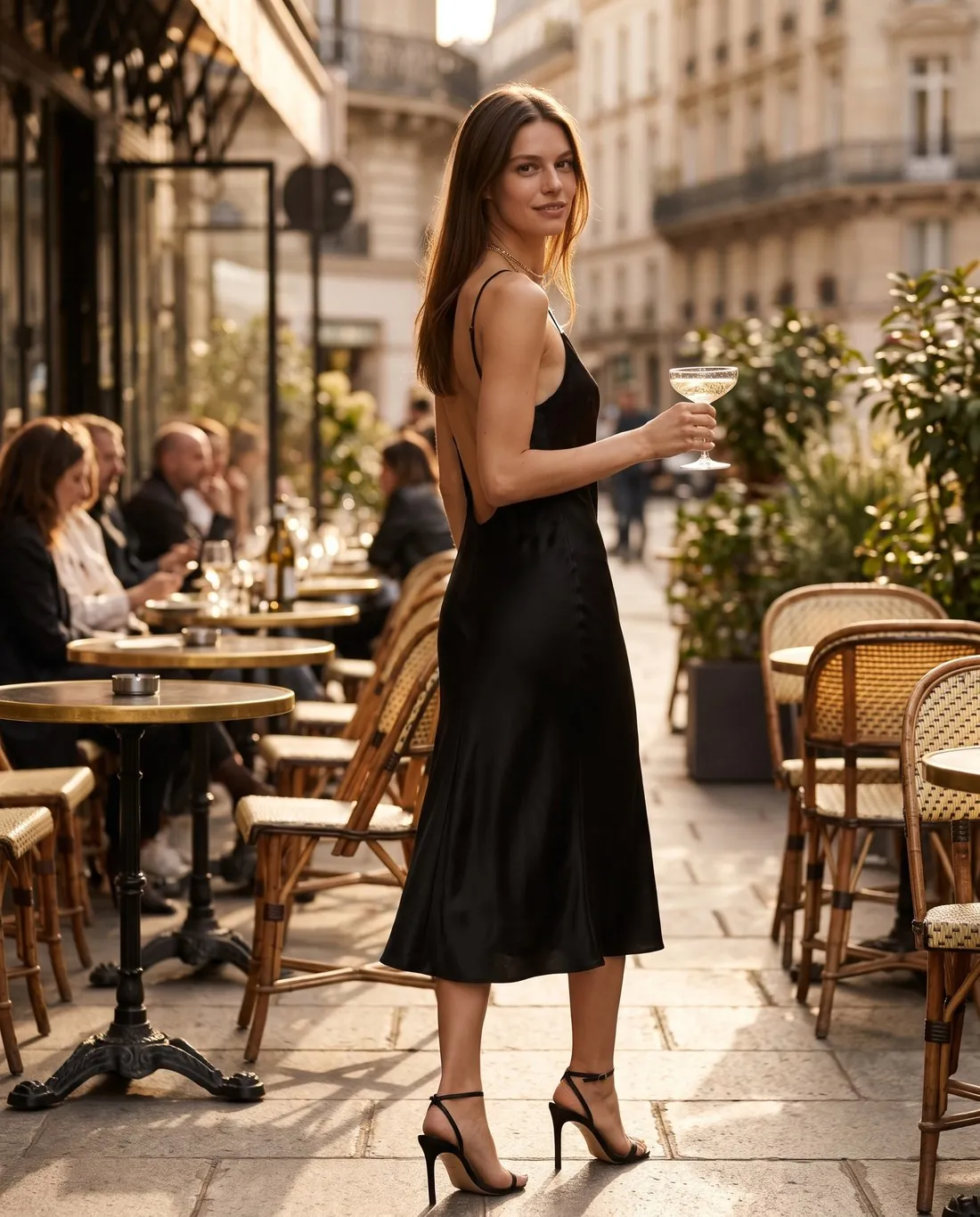
What the Virtual try-on API does
The garment can be photographed on a hanger, laid flat, on a mannequin or worn; bags, hats, shoes, glasses and jewelry go in the same garment slot. garment_type is the only required setting: it tells the model where the product is worn, and garment_category narrows it to one of 47 product types. A back photo enables the back view, outfit slots dress the rest of the look in your own pieces, and a photo of a real person can replace the generated model when consent is recorded in the request.
Create the job
Upload the photo with POST /api/v1/assets first and put the returned id where ASSET_ID stands.
curl https://app.herofab.app/api/v1/jobs \
  -H "Authorization: Bearer $HEROFAB_API_KEY" \
  -H "Idempotency-Key: $(uuidgen)" \
  --json '{
    "tool": "apparel_tryon",
    "inputs": {
      "garment": "ASSET_ID"
    },
    "params": {
      "garment_type": "one_piece",
      "garment_category": "dress",
      "pose": "walking",
      "background": "studio_white",
      "aspect_ratio": "3:4"
    }
  }'
const res = await fetch("https://app.herofab.app/api/v1/jobs", {
method: "POST",
headers: {
Authorization: `Bearer ${process.env.HEROFAB_API_KEY}`,
"Content-Type": "application/json",
"Idempotency-Key": crypto.randomUUID(),
},
body: JSON.stringify({
"tool": "apparel_tryon",
"inputs": {
"garment": "ASSET_ID"
},
"params": {
"garment_type": "one_piece",
"garment_category": "dress",
"pose": "walking",
"background": "studio_white",
"aspect_ratio": "3:4"
}
}),
});
const job = await res.json(); // 201: state "queued", credits heldimport os, uuid, requests
job = requests.post(
"https://app.herofab.app/api/v1/jobs",
headers={
"Authorization": f"Bearer {os.environ['HEROFAB_API_KEY']}",
"Idempotency-Key": str(uuid.uuid4()),
},
json={
"tool": "apparel_tryon",
"inputs": {
"garment": "ASSET_ID"
},
"params": {
"garment_type": "one_piece",
"garment_category": "dress",
"pose": "walking",
"background": "studio_white",
"aspect_ratio": "3:4"
}
},
).json() # 201: state "queued", credits heldWhat to upload
Each input is an asset id. The upload tips are the ones the Herofab app shows next to each slot.
| Role | Required | What to upload |
|---|---|---|
garmentProduct image | Required | One item — a garment, bag, hat, shoes, glasses or jewelry — fully visible and shot straight on: flat lay, hanger, mannequin or worn; shoes, glasses and jewelry on a plain surface. Avoid folded, cropped or overlapping items. |
background_imageBackground image | Optional | The scene to place the model in. A sharp, uncluttered photo works best. |
garment_backProduct · back view | Optional | The back of the same item, photographed the same way as the front. |
garment_detailProduct · detail close-up | Optional | A close-up of the fabric, print, buckle or zipper, so small details stay accurate. |
modelModel image | Optional | One person facing the camera, arms away from the torso, in even light. Avoid sunglasses, bags or anything covering the body. |
outfit_bottomOutfit · bottom | Optional | Trousers, a skirt or shorts to style with your product. Shot flat or on a hanger, fully visible. |
outfit_shoesOutfit · shoes | Optional | The shoes the model should wear with your product. A clear side or front shot of the pair. |
outfit_topOutfit · top | Optional | A top to style with your product, e.g. your own brand's shirt. Shot flat or on a hanger, fully visible. |
Every setting and its values
Settings go in params; a value outside the list is refused with 422.
| Setting | Allowed values | Default |
|---|---|---|
garment_typeProduct type | top, bottom, one_piece One-piece, bag, headwear Hat / headwear, jewelry, footwear Shoes, eyewear Glasses | none — required |
aspect_ratioAspect ratio | 1:1, 3:4, 4:5, 2:3, 9:16, 4:3, 16:9 | 3:4 |
backgroundBackground | studio_white Studio · white, studio_grey Studio · grey, outdoor, lifestyle, seaside_rocks, wooden_pier, city_street, whitewashed_village Mediterranean village, cafe_terrace Café terrace, garden, keep Keep as is, custom My own image | studio_white |
expressionExpression | neutral, smile | neutral |
garment_categoryProduct category | unspecified, abaya, backpack, beanie, blazer, blouse, boots, bracelet, brimmed_hat, bucket_hat, cap, cardigan, clutch, coat, crossbody_bag, dress, earrings, eyeglasses, flats, handbag, heels, hoodie, jacket, jeans, jumpsuit, knitwear Knitwear / sweater, leggings, loafers, necklace, ring, sandals, shirt, shorts, shoulder_bag, skirt, sneakers, sportswear Sportswear set, suit, sunglasses, sweatshirt, t_shirt T-shirt, tote_bag, tracksuit_bottoms, trousers, tunic, vest | unspecified |
genderGender | unspecified, female, male | unspecified |
lightLight | scene_default Scene's own light, morning, golden_hour, overcast | scene_default |
marketplaceMarketplace size | none, amazon 1,600 × 1,600 px, ebay 1,600 × 1,600 px, etsy 2,000 × 2,000 px, hepsiburada, shopify 2,048 × 2,048 px, trendyol 1,200 × 1,800 px | none |
model_consentConsent | true, false | false |
posePose | standing_front Standing · front, standing_three_quarter Standing · three-quarter, walking, hands_on_hips, hands_in_pockets, arms_crossed, leaning, sitting, looking_away, close_up Close-up | standing_front |
resolutionResolution | 2k, 4k | 2k |
sizeSize | XS, S, M, L, XL, XXL | M |
stylingComplete the look | plain, accessorized With accessories | plain |
viewView | front, front_back Front + back in one image, back | front |
Rules between inputs and settings
- inputs.background_image is used only when params.background is "custom", and that value needs it
- a photo of a real person in inputs.model needs params.model_consent = "true"; a saved model (mannequin_id) or a model generated earlier in the same chain does not
- params.view = "back" needs inputs.garment_back
The app's workflow cards as API settings
The Workflows page of the Herofab app opens this tool with these fixed settings.
| Workflow card | Product families | params |
|---|---|---|
| Show it on a model | Jewelry | {"garment_type":"jewelry"} |
| Close-up on a model | Jewelry | {"garment_type":"jewelry","pose":"close_up"} |
| Show it on a model | Clothing | {"garment_type":"top"} |
| Front and back on a model | Clothing | {"garment_type":"top","view":"front_back"} |
| On a model in the city | Clothing | {"garment_type":"top","background":"city_street"} |
| Show it on a model | Footwear | {"garment_type":"footwear"} |
| Show it on a model | Bags | {"garment_type":"bag"} |
| Show it on a model | Eyewear | {"garment_type":"eyewear"} |
One call, one image per value
POST /api/v1/batches with vary opens one job per value of pose. This request reserves 20 credits (4 × 5 credits).
curl https://app.herofab.app/api/v1/batches \
  -H "Authorization: Bearer $HEROFAB_API_KEY" \
  -H "Idempotency-Key: $(uuidgen)" \
  --json '{
    "tool": "apparel_tryon",
    "inputs": {
      "garment": "ASSET_ID"
    },
    "params": {
      "garment_type": "one_piece",
      "garment_category": "dress",
      "background": "studio_white",
      "aspect_ratio": "3:4"
    },
    "vary": {
      "pose": [
        "standing_front",
        "walking",
        "hands_on_hips",
        "sitting"
      ]
    }
}'Feed the result into the next tool
Two steps in one POST /api/v1/chains request; input_role names where this tool's output goes. This chain reserves 9 credits.
curl https://app.herofab.app/api/v1/chains \
  -H "Authorization: Bearer $HEROFAB_API_KEY" \
  -H "Idempotency-Key: $(uuidgen)" \
  --json '{
    "steps": [
      {
        "tool": "apparel_tryon",
        "inputs": {
          "garment": "ASSET_ID"
        },
        "params": {
          "garment_type": "one_piece",
          "garment_category": "dress",
          "background": "studio_white",
          "aspect_ratio": "3:4"
        }
      },
      {
        "tool": "reframe",
        "input_role": "source",
        "params": {
          "aspect_ratio": "9:16"
        }
      }
    ]
}'What a request costs
5 credits per image. One credit costs $0.04 to $0.12 before tax depending on the plan or credit pack, so one image costs $0.20 to $0.60 before tax. resolution "4k" adds 1 credit.
Where this image type is not accepted
These marketplaces rule out the image type this tool makes in their own published rules:
Virtual try-on API questions
How much does the Virtual try-on API cost?
5 credits per image ($0.20 to $0.60 before tax), the same as in the app. resolution "4k" adds 1 credit.
How do I get the front and the back of the same garment on a model?
Upload the back photo as inputs.garment_back. view "front_back" puts both sides in one image; a batch with vary {"view": ["front", "back"]} makes two separate images of the same model.
Can my own model wear the product?
Yes. Upload the person as inputs.model and send params.model_consent "true"; without it the job is refused. A model created with model_maker earlier in the same chain needs no consent value, because no real person is involved.
Your next collection, shot this week.
20 credits at sign-up, no card required. Images made with free credits carry a watermark. Herofab also removes the watermark from those images once credits are purchased.